How to write a website audit email a business owner will read
How to write a first email about a website audit: which finding to lead with, a subject line that gets opened, four templates, and what never to send.
A website audit email has one job: get the owner to look at one problem on their own website. It does not need to sell a project, list your services or prove you are clever. If they open the report and recognise the problem, you have a conversation. If they do not, nothing else in the email would have saved it.
Most audit emails fail for the same three reasons. They lead with forty findings instead of one. They describe the finding in a vocabulary the owner does not use. And they read as if they were sent to a thousand people, because they usually were.
This guide is about the other kind: one message, written by a person, about one business.
Choose the one finding to lead with
An audit of a typical small business site returns dozens of findings. Pick one, using three tests.
The owner can check it in under a minute, on their phone. "Your site takes eleven seconds to show anything on a phone" can be tested by opening the site. "Your Largest Contentful Paint is 6.8 seconds" cannot, by them.
It costs them something they care about. Lost calls, lost bookings, emails landing in spam, a browser warning on the contact form. Not a score.
You can fix it, and it is what you sell. Leading with an accessibility finding when you sell SEO retainers sets up the wrong conversation.
A finding that passes all three is usually one of these: a slow mobile load, a security warning in the browser, missing email authentication on their domain, a broken contact form, or a business that cannot be found on the map outside its own street.
How to present a website audit to a business owner goes deeper on translating findings into consequences. The same rules apply to an email, only shorter.
The subject line
Name their business and the thing you found. Nothing else.
Anderson Plumbing: your contact form is not sending
A quick note about andersonplumbing.com on phones
Emails from @andersonplumbing.com may be landing in spam
Avoid anything that reads as a campaign: "Quick question", "Free audit inside", percentages, emoji, or the word "free" in the subject at all.
The structure
Keep it under 120 words. Four short paragraphs:
Who you are, in one line. Your name, what you do, where you are.
What you found. One finding, stated as a fact, with how they can check it.
What it costs them. One sentence, in their terms.
One easy next step. A link to the report, and a question that can be answered with yes or no.
Then your name, your business address, and a plain line saying they can reply "no thanks" and you will not get in touch again.
Four templates
Adapt the details. Never send one without changing them, because the specific detail is the whole point.
When the site is slow on a phone
Hi Sarah,
I'm Tom, I build websites for trades businesses in Leeds. I ran a check on andersonplumbing.com and on a typical phone connection it takes about eleven seconds before anything appears. You can see it by opening the site on your phone with Wi-Fi turned off.
Most people looking for an emergency plumber will have rung someone else by then.
I've put the full results here: [report link]. Would a ten-minute call this week to go through it be useful?
Tom Reed, Reed Web, 14 Kirkgate, Leeds. Reply "no thanks" and I won't contact you again.
When the business email may be landing in spam
Hi Sarah,
I'm Tom, I look after websites and email for local businesses. Your domain, andersonplumbing.com, has no DMARC record and its SPF record does not include the service your email is sent through. Gmail and Outlook now treat mail like that with suspicion, so quotes you send by email may be going to spam.
The details, and the two records that would fix it, are here: [report link]. Happy to talk it through if useful.
The SPF, DKIM and DMARC guide explains how to check this and how to explain it.
When the browser shows a security warning
Hi Sarah,
Your website's security certificate expired on 3 November, so most browsers now show a "not secure" warning before anyone reaches your contact page. You can see it by visiting andersonplumbing.com.
It is usually a short fix. The check is here: [report link]. Would you like me to tell you what your current host needs to do?
When there is no website at all
Hi Sarah,
Your Google listing has 62 reviews and a 4.8 rating, which is better than any plumber near you, but no website link. Three of your recent reviews mention having to ring to check prices.
I've put together what a customer searching for a plumber in your area sees today: [report link]. Would it be worth a short call?
How to find local businesses without a website covers how to decide which of those businesses are worth that email.
What never to send
A list of every finding. The report holds the detail; the email holds the reason to open it.
A score on its own. "Your site scored 41" invites the reply "says who?". A measurement they can see for themselves does not.
Anything you have not verified. If the audit could not measure something, do not guess. One wrong claim in a first message ends the conversation.
A sequence. One message, and at most one short follow-up a week later if they have not replied. After that, stop.
Send it properly
An email about broken email authentication that lands in spam itself is a bad start. Send from your own mailbox on your own domain, with SPF, DKIM and DMARC set up correctly, and keep the volume to what you could write by hand. Commercial email to businesses is regulated: in the US by the CAN-SPAM Act, and in the UK by PECR. Say who you are, include a postal address, and honour an opt-out immediately.
How SiteAssay helps
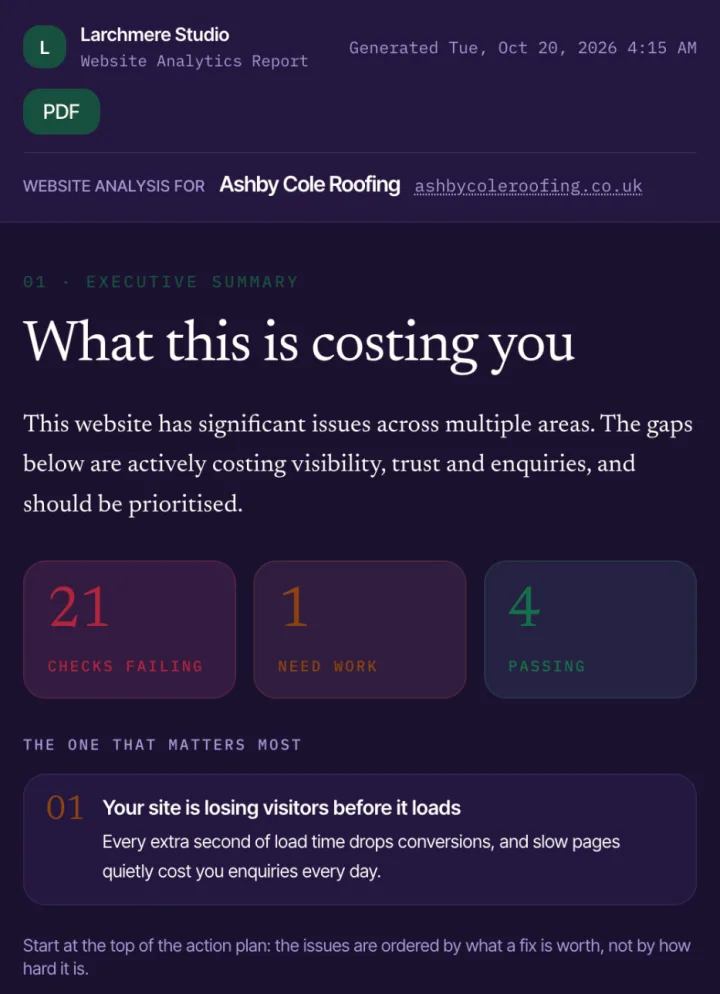
A report from SiteAssay's demo workspace, opened on a phone under the agency's own name. The one finding worth leading with sits above everything else.
A SiteAssay audit ranks findings by the service you sell and gives each one a plain-English consequence, so the finding to lead with is usually the first one on the list. The report link opens on a phone without a login, carries your branding (see white-label website audit reports), and tells you when it has been viewed.
If you use SiteAssay's outreach, it drafts a first email from what the audit found on that business's own website. Nothing is sent until you have read and approved it, it goes from your own mailbox, and every message carries a one-click unsubscribe. An address that opts out is never mailed again.
Questions
How long should a website audit email be?
Under 120 words. One finding, what it costs, and a link to the report. Everything else belongs in the report or the call.
Should I attach the audit as a PDF?
Link to it instead. Attachments from someone a business has not emailed before are more likely to be filtered, and a link lets you see whether it was opened.
How many times should I follow up?
Once, about a week later, in a sentence or two. If there is still no reply, leave it.
Is it better to email or call?
Use the channel the business publishes for enquiries. A short email with a report link has one advantage: the owner can check the finding before deciding whether to talk to you.
Written by
SiteAssay